¶ development, staging, testing, production
¶ Twelve factor app
- https://12factor.net/dev-prod-parity
- https://nodejs.org/en/learn/getting-started/nodejs-the-difference-between-development-and-production
¶ GitOps
The idea of GitOps is simple—we use Git to describe our infrastructure and configuration management.
Any change to a defined branch will trigger the relevant changes.
If you are able to define the whole system through code, Git gives you a lot of advantages:
- Any change to either infrastructure or configuration management is versioned.
- They are explicit and can be rolled back if they have problems. Changes between versions can be observed through diffs, which is a normal Git operation.
- A Git repo can act as a backup that can enable recovery from scratch if there's a catastrophic failure in the underlying hardware.
- It is the most common source control tool. Everyone in the company likely knows how it works and can use it. It also easily integrates with existing workflows, like
¶ Github Actions
¶ Marketplace
¶ Workflow Reference:
¶ runs-on:
| Runner image | YAML workflow label | Notes |
|---|---|---|
| Windows Server 2022 | windows-latest or windows-2022 |
The windows-latest label currently uses the Windows Server 2022 runner image. |
| Windows Server 2019 | windows-2019 |
|
| Ubuntu 22.04 | ubuntu-latest or ubuntu-22.04 |
The ubuntu-latest label currently uses the Ubuntu 22.04 runner image. |
| Ubuntu 20.04 | ubuntu-20.04 |
|
| Ubuntu 18.04 [deprecated] | ubuntu-18.04 |
Migrate to ubuntu-20.04 or ubuntu-22.04. this GitHub blog post. |
| macOS Monterey 12 | macos-12 |
|
| macOS Big Sur 11 | macos-latest or macos-11 |
The macos-latest label is currently transitioning to the macOS Monterey 12 runner image. During the transition, the label might refer to the runner image for either macOS 11 or 12. this GitHub blog post. |
| macOS Catalina 10.15 [deprecated] | macos-10.15 |
Migrate to macOS-11 or macOS-12. this GitHub blog post. |
¶ uses:
actions/checkout@v3
¶ env
¶ python versions:
https://raw.githubusercontent.com/actions/python-versions/main/versions-manifest.json
¶ Examples
¶ python
https://docs.github.com/en/actions/automating-builds-and-tests/building-and-testing-python
¶ FastAPI
https://github.com/tiangolo/fastapi/blob/master/.github/workflows/test.yml
name: Test

on:
  push:
    branches:
      - master
  pull_request:
    types: [opened, synchronize]

jobs:
  test:
    runs-on: ubuntu-latest
    strategy:
      matrix:
        python-version: ["3.7", "3.8", "3.9", "3.10", "3.11"]
      fail-fast: false

    steps:
      - uses: actions/checkout@v3
      - name: Set up Python
        uses: actions/setup-python@v4
        with:
          python-version: ${{ matrix.python-version }}
          cache: "pip"
          cache-dependency-path: pyproject.toml
      - uses: actions/cache@v3
        id: cache
        with:
          path: ${{ env.pythonLocation }}
          key: ${{ runner.os }}-python-${{ env.pythonLocation }}-${{ hashFiles('pyproject.toml') }}-test-v03
      - name: Install Dependencies
        if: steps.cache.outputs.cache-hit != 'true'
        run: pip install -e .[all,dev,doc,test]
      - name: Lint
        run: bash scripts/lint.sh
      - run: mkdir coverage
      - name: Test
        run: bash scripts/test.sh
        env:
          COVERAGE_FILE: coverage/.coverage.${{ runner.os }}-py${{ matrix.python-version }}
          CONTEXT: ${{ runner.os }}-py${{ matrix.python-version }}
      - name: Store coverage files
        uses: actions/upload-artifact@v3
        with:
          name: coverage
          path: coverage
  coverage-combine:
    needs: [test]
    runs-on: ubuntu-latest

    steps:
      - uses: actions/checkout@v3

      - uses: actions/setup-python@v4
        with:
          python-version: '3.8'
          cache: "pip"
          cache-dependency-path: pyproject.toml

      - name: Get coverage files
        uses: actions/download-artifact@v3
        with:
          name: coverage
          path: coverage

      - run: pip install coverage[toml]

      - run: ls -la coverage
      - run: coverage combine coverage
      - run: coverage report
      - run: coverage html --show-contexts --title "Coverage for ${{ github.sha }}"

      - name: Store coverage HTML
        uses: actions/upload-artifact@v3
        with:
          name: coverage-html
          path: htmlcov
¶ run job on specific branch
¶ MongoDB
Two ways to use mongodb in GHA
Option 1
name: unit-tests
run-name: ${{ github.actor }} backend unit test workflow
on:
  push:
    branches:
      - 'feature/**'
    paths:
      - backend/**
jobs:
  test:
    runs-on: ubuntu-latest
    strategy:
      # workflow will not stop job if matrix job fails must be true if kubernetes job included
      fail-fast: false
    services:
      mongodb:
        image: mongo:7.0.0
        ports:
          - 27017:27017
        options: >-
          --health-cmd "mongosh --eval 'db.runCommand({ ping: 1 })'"
          --health-interval 10s
          --health-timeout 5s
          --health-retries 5
Option 2
name: unit-tests
run-name: ${{ github.actor }} backend unit test workflow
on:
  push:
    branches:
      - 'feature/**'
    paths:
      - backend/**
jobs:
  test:
    runs-on: ubuntu-latest
    strategy:
      # workflow will not stop job if matrix job fails must be true if kubernetes job included
      fail-fast: false
      matrix:
        # runs workflow for each version
        mongodb-version: ['7.0']
    env:
      ENV_NAME: development
    steps:
      # https://github.com/marketplace/actions/mongodb-in-github-actions
      - name: Start MongoDB
        uses: supercharge/mongodb-github-action@1.7.0
        with:
          mongodb-version: ${{ matrix.mongodb-version }}
¶ Bitbucket Pipelines
¶ Examples
# Continuous Delivery Pipeline (CD Pipeline)
image: python:3.10
# image: amazon/aws-cli:latest

options:
  docker: true

pipelines:
  branches:

    develop:
      - step:
          name: Terraform Apply
          image: hashicorp/terraform:1.5.0
          deployment: development
          script:
            - env
            - aws s3 cp $WHL_FILE_S3_DEVELOP .
            - chmod +x deploy_tf_pipeline
            - source deploy_tf_pipeline
            - cd tf_pipeline
            - terraform_apply

      - step:
          name: API - Build & Push Image to ECR
          image: amazon/aws-cli:latest
          script:
            - export WHL_FILE=./*.whl
            - chmod +x scripts/docker_build_push_ecr
            - source scripts/docker_build_push_ecr
            - aws s3 cp $WHL_FILE_S3_DEVELOP .
            - ecr_build_push Dockerfile $API_ECR_REPO_NAME $WHL_FILE
      - step:
          name: Update ECS with New ECR Image
          image: amazon/aws-cli:latest
          script:
            - chmod +x scripts/aws_cli_funcs
            - source scripts/aws_cli_funcs
            - ecs_update $API_CLUSTER_NAME $API_SERVICE_NAME
definitions:
  services:
    docker:
      memory: 3072
¶ AWS
¶ zip lambda layer bash function
If using lambda layers as zip file.
This will create a python environment
#!/bin/bash

set -e

create_lambda_layer_venv() {
    # # on first create
    # e.g: python3.9
    local python_version=$1
    # e.g: py39
    local venv_name=$2
    pip install virtualenv
    virtualenv -p $python_version $venv_name
}
update_lambda_layer_venv() {
    # zip ~/bin folder
    # zip everythin under site-packages
    # into layer/python/

    local python_version=$1
    local venv_name=$2
    shift 2
    # # on first create
    # # pip install virtualenv
    # # virtualenv -p $env $venv_name

    echo "[+] Activation VENV NOW"
    source $venv_name/bin/activate
    echo "[+] Activation Complete"

    echo "[+] Uninstalling all packages from activated VENV ...."
    # could also delete venv_name folder, but this is more elegant
    pip3 freeze | cut -d "@" -f1 | xargs pip uninstall -y
    echo "[+] UNINSTALL Complete"

    echo "[+] ----"
    echo "[+] INSTALLING SPECIFIED PACKAGES ..."
    pip3 install "$@"  # Install the package list
    echo "[+] RE-Install all packages complete ....."

    echo "[+] Re-structuring VENV dir to be compatible with lambda layer specs..."
    cd $venv_name
    rm -rf python
    mkdir python
    cp -r ./lib/$python_version/site-packages/* python
    cp -r ./bin python

    # delete python dir in lambda_layer
    # rm -rf ../lambda_layer/python
    # copy new ./python to lambda_layer
    cp -r python ../lambda_layer
    # redeploy terraform
}
¶ DNS
¶ DNS Record Types
Here are the 8 most commonly used DNS Record Types.
A (Address) Record
- Maps a domain name to an IPv4 address. It is one of the most essential records for translating human-readable domain names into IP addresses.
CNAME (Canonical Name) Record
- Used to alias one domain name to another. Often used for subdomains, pointing them to the main domain while keeping the actual domain name hidden.
AAAA Record
- Similar to an A record but maps a domain name to an IPv6 address. They are used for websites and services that support the IPv6 protocol.
PTR Record
- Provides reverse DNS lookup, mapping an IP address back to a domain name. It is commonly used in verifying the authenticity of a server.
MX Record
- Directs email traffic to the correct mail server.
NS (Name Server) Record
- Specifies the authoritative DNS servers for the domain. These records help direct queries to the correct DNS servers for further lookups.
SRV (Service) Record
- SRV record specifies a host and port for specific services such as VoIP. They are used in conjunction with A records.
TXT (Text) Record
- Allows the administrator to add human-readable text to the DNS records. It is used to include verification records, like SPF, for email security.
| Tables | Description |
|---|---|
| A | Address record, which maps host names to their IPv4 address. |
| AAAA | IPv6 Address record, which maps host names to their IPv6 address. |
| CAA | Certificate Authority (CA) Authorization, which specifies which CAs are allowed to create certificates for a domain. |
| CNAME | Canonical name record, which specifies alias names. Cloud DNS does not support resolving CNAMEs recursively across different managed private zones (CNAME chasing). |
| IPSECKEY | IPSEC tunnel gateway data and public keys for IPSEC-capable clients to enable opportunistic encryption. |
| MX | Mail exchange record, which routes requests to mail servers. |
| NAPTR | Naming authority pointer record, defined by RFC 3403. |
| NS | Name server record, which delegates a DNS zone to an authoritative server. |
| PTR | Pointer record, which is often used for reverse DNS lookups. |
| SOA | Start of authority record, which specifies authoritative information about a DNS zone. An SOA resource record is created for you when you create your managed zone. You can modify the record as needed (for example, you can change the serial number to an arbitrary number to support date-based versioning). |
| SPF | Sender Policy Framework record, a deprecated record type formerly used in e-mail validation systems (use a TXT record instead). |
| SRV | Service locator record, which is used by some voice over IP, instant messaging protocols, and other applications. |
| SSHFP | SSH fingerprint for SSH clients to validate the public keys of SSH servers. |
| TLSA | TLS authentication record, for TLS clients to validate X.509 server certificates. |
| TXT | Text record, which can contain arbitrary text and can also be used to define machine-readable data, such as security or abuse prevention information. A TXT record may contain one or more text strings; the maximum length of each individual string is 255 characters. Mail agents and other software agents concatenate multiple strings. Enclose each string in quotation marks. For example: |
Ben Awad: https://www.youtube.com/watch?v=fWD_ciSWklQ
-
A maps external ip to domain name on another server.
- e.g. Namecheap owned domain > digital ocean.
-
CNAME maps domain name to where domain is owned
- e.g. namecheap > netlify
¶ Email Server
¶ Google Cloud
- https://cloud.google.com/dns
- https://cloud.google.com/dns/docs/quickstart
- https://cloud.google.com/community/tutorials/setting-up-lamp#setting-up-dns
- https://cloud.google.com/appengine/docs/standard/java/mapping-custom-domains
¶ Setting up DNS
Main:
Other:
-
If you have an existing DNS provider that you want to use, you need to create a couple of records with that provider.
- This lesson assumes that you are mapping example.com and www.example.com to point to your website hosted on Compute Engine.
-
For the example.com domain name, create an A record with your DNS provider.
- For the www.example.com sub-domain, create a CNAME record for www to point it to the example.com domain.
- The A record maps a host name to an IP address.
- The CNAME record creates an alias for the A record.
- This lesson assumes you want example.com and www.example.com to map to the same IP address.
-
Get your external IP address for your instance.
-
You can look up the IP address from the VM instances page in the Cloud Platform Console.
-
Sign in to your provider's DNS management interface and find the domain that you want to manage.
- Refer to your DNS provider's documentation for specific steps.
-
Create an A record and set the value to your external IP address. The name or host field can be set to @, which represents the naked domain.
- For more information, the Google Apps support page provides help for completing various DNS tasks.
-
Create a CNAME record, set the name to www, and set the value to @ or to your hostname followed by a period: example.com.. Read the Google Apps support for help creating the A record with various providers.
-
If appropriate for your provider, increment the serial number in your SOA record to reflect that changes have been made so that your records will propagate.
-
Verify your DNS changes
-
If your domain name registrar, such as Google Domains, is also your DNS provider, you're probably all set.
- If you use separate providers for registration and DNS, make sure that your domain name registrar, has the correct name servers associated with your domain.
-
After making your DNS changes, the record updates will take some time to propagate depending on your time-to-live (TTL) values in your zone.
- If this is a new hostname, the changes should go into effect quickly because the DNS resolvers will not have cached previous values and will contact the DNS provider to get the necessary information to route requests.
¶ Kubernetes
¶ Commands
kubectl logs -l app=frontend
kubectl get services
kubectl get pods
Download the YAML for a Specific Deployment
kubectl get deployment <deployment-name> -n <namespace> -o yaml > <local-filename>.yaml
Downloading All Deployments in a Namespacekubectl get deployments -n cert-manager -o yaml > all-deployments.yaml
Force pull new image if tag hasn't changed.
Will redeploy pod with new image
kubectl rollout restart deployment/frontend
kubectl rollout undo deployment/<deployment-name>
kubectl set image deployment/frontend frontend=frontend:1
kubectl set image deployment/my-app my-container=my-app:v2.0

kubectl get namespaces
kubectl get pods --namespace default
kubectl get deployments -n <namespace>

kubectl describe node gke-my-cluster-1-default-pool-123dg50w-teq5

kubectl get deployment cert-manager -n cert-manager -o yaml > cert-manager-deployment.yaml
kubectl get deployment cert-manager-cainjector -n cert-manager -o yaml > cert-manager-cainjector-deployment.yaml
kubectl get deployment cert-manager-webhook -n cert-manager -o yaml > cert-manager-webhook-deployment.yaml

kubectl get deployments -n gmp-system -o yaml > gmp-system.yaml
kubectl rollout restart deployment -n gmp-system

kubectl apply -f cert-manager-deployment.yaml
kubectl apply -f cert-manager-cainjector-deployment.yaml

kubectl rollout restart deployment cert-manager -n cert-manager
kubectl rollout restart deployment cert-manager-cainjector -n cert-manager

kubectl describe deployment cert-manager -n cert-manager
kubectl get pods --namespace cert-manager

kubectl logs -l app.kubernetes.io/name=cert-manager -n cert-manager
kubectl logs -l app.kubernetes.io/component=webhook -n cert-manager

kubectl get validatingwebhookconfigurations cert-manager-webhook -ojson | jq '.webhooks[].clientConfig'

kubectl auth can-i get leases --as=system:serviceaccount:cert-manager:cert-manager -n cert-manager

kubectl get ingress
kubectl describe ingress gateway-ingress

kubectl -n cert-manager get all

kubectl explain Certificate
kubectl explain CertificateRequest
kubectl explain Issuer
# Restart each cert-manager service
kubectl rollout restart deployment cert-manager -n cert-manager
kubectl rollout restart deployment cert-manager-cainjector -n cert-manager
kubectl rollout restart deployment cert-manager-webhook -n cert-manager
# Cert manager logs
# Ensure there are no forbidden errors.
kubectl logs -l app=cert-manager -n cert-manager
kubectl logs -l app.kubernetes.io/name=cert-manager -n cert-manager
kubectl logs -l app=cainjector -n cert-manager
# should be yes
kubectl auth can-i get leases --as=system:serviceaccount:cert-manager:cert-manager -n cert-manager

kubectl get serviceaccounts -n cert-manager
kubectl get rolebinding -n cert-manager
# If issuse still persists, u can re-apply default rbac
kubectl apply -f https://github.com/cert-manager/cert-manager/releases/download/v1.13.0/cert-manager.rbac.yaml
Install NGINX & Cert-Manager
#!/bin/sh

# https://cert-manager.io/docs/tutorials/acme/nginx-ingress/#issuers
# https://kubernetes.github.io/ingress-nginx/deploy/

###### Add the latest helm repository for the ingress-nginx
helm repo add ingress-nginx https://kubernetes.github.io/ingress-nginx

###### Update the helm repository with the latest charts:
helm repo update

#### Use helm to install an NGINX Ingress controller:
helm install quickstart ingress-nginx/ingress-nginx

kubectl apply -f ./scripts/cd/ingress.yaml
envsubst < ./scripts/cd/my-app.yaml | kubectl apply -f -

envsubst < ./scripts/cd/my-app.yaml | kubectl delete -f -
kubectl rollout restart deployment/my-app

curl -kivL -H 'Host: my-host.com' 'http://11.11.11.11.11'

### Install Cert Manager & Other Cmds
# https://cert-manager.io/docs/installation/

kubectl apply -f https://github.com/cert-manager/cert-manager/releases/download/v1.16.2/cert-manager.yaml

kubectl apply -f ./scripts/cd/issuer-prod.yaml
kubectl apply -f ./scripts/cd/issuer-staging.yaml

kubectl describe issuer letsencrypt-staging
kubectl describe issuer letsencrypt-prod

kubectl get pods -n cert-manager
kubectl get certificates
kubectl describe certificate my-secret-name
kubectl get secrets
kubectl describe secret  my-secret-name
kubectl describe orders
kubectl describe challenges

kubectl delete secret my-secret-name
# check certificates
kubectl get certificate
# cert-manager reflects the state of the process for every request in the certificate object.
# You can view this information using the kubectl describe command:
kubectl describe certificate quickstart-example-tls

kubectl describe secret quickstart-example-tls-3
kubectl describe secret quickstart-example-tls-3-2qxsq
kubectl describe secret my-secret-name-1-591832212

# delete the staging secret before production
# kubectl delete secret quickstart-example-tls
kubectl get orders
kubectl get challenges
kubectl describe order quickstart-example-tls-1l3ew
kubectl describe order quickstart-example-tls-3
kubectl describe ingress gateway
Verify Certs Created for Domain
curl -v --insecure https://my-host.com
curl -kivL -H 'Host: my-host.com' 'http://11.11.11.11.11'
# ensure A record is loadbalancers ip
nslookup my-host.com
List Deployments in a cluster.
kubectl get deployments
kubectl get deployments -n default
kubectl get deployments -o wide
kubectl describe deployment <deployment-name>
kubectl describe deployment api
kubectl get deployments --all-namespaces
kubectl scale deployment <deployment-name> --replicas=0
kubectl scale deployment --all --replicas=0 -n default
# List all deployments in all namespaces in the cluster.
kubectl get deployments --all-namespaces

# Output:
# NAMESPACE      NAME                                  READY   UP-TO-DATE   AVAILABLE   AGE
# cert-manager   cert-manager                          1/1     1            1           7d23h
# cert-manager   cert-manager-cainjector               1/1     1            1           7d23h
# cert-manager   cert-manager-webhook                  1/1     1            1           7d23h
# default        ap                                    1/1     1            1           12d
# default        ap-ai                                 1/1     1            1           12d
# default        quickstart-ingress-nginx-controller   1/1     1            1           10d
# default        frontend-client                       1/1     1            1           10d
# kube-system    event-exporter-gke                    1/1     1            1           12d
# kube-system    konnectivity-agent                    3/3     3            3           12d
# kube-system    konnectivity-agent-autoscaler         1/1     1            1           12d
# kube-system    kube-dns                              2/2     2            2           12d
# kube-system    kube-dns-autoscaler                   1/1     1            1           12d
# kube-system    l7-default-backend                    1/1     1            1           12d
# kube-system    metrics-server-v1.30.3                1/1     1            1           12d
# Instead of deleting, you can scale down to 0 replicas:
# This stops the pod from running without permanently deleting the deployment, useful if you may redeploy later.

# scale a single deployment to 0
kubectl scale deployment <deployment-name> --replicas=0
# scale all deployments to 0 in a namespace
kubectl scale deployment --all --replicas=0 -n default
# check if they are all scaled to 0
kubectl get deployments -o wide
¶ Delete
- To delete the pod or container from your Kubernetes cluster and avoid further billing, follow these steps:
¶ 1. Delete the Deployment or Pod
- Check the running pods
kubectl get pods
- Identify the pod or deployment name you want to delete.
- Delete the pod (if created manually)
kubectl delete pod <pod-name>
- Delete the deployment (if created via deployment)
kubectl delete deployment <deployment-name>
- Delete the service (if exposed)
kubectl delete service <service-name>
¶ 2. Delete the Namespace (Optional)
If you created a namespace specifically for this microservice, you can delete it entirely:
Note: Deleting a namespace deletes all resources within it.
kubectl delete namespace <namespace-name>
¶ 3. Verify Deletion
- Check that no pods, services, or deployments remain:
kubectl get all
¶ 4. Remove Persistent Volumes (if any)
- If your microservice used persistent volumes, delete them to stop being billed for storage:
kubectl delete pvc --all
kubectl delete pv --all
¶ 5. Scale Down (Alternative to Deleting)
- Instead of deleting, you can scale down to 0 replicas:
- This stops the pod from running without permanently deleting the deployment, useful if you may redeploy later.
kubectl scale deployment <deployment-name> --replicas=0
¶ 6. Deleting the Cluster (Optional)
- If you created a dedicated cluster for testing, delete the entire cluster to avoid any lingering costs:
- For GKE (Google Kubernetes Engine):
gcloud container clusters delete <cluster-name>
- For EKS (AWS Elastic Kubernetes Service):
eksctl delete cluster --name <cluster-name>
- For AKS (Azure Kubernetes Service):
az aks delete --name <cluster-name> --resource-group <resource-group>
¶ minikube
When deploying to minikube on localhost you dont need to push the image to your cloud image repo.
minikube can deploy the images from your local docker environment.
Set kubectl to use minikube.
kubectl config get-contexts
kubectl config use-context minikube
minikube start
# or
minikube start --driver=docker --memory=8192 --cpus=4
# ping 192.168.49.2

minikube ip
# kubectl config set-cluster minikube --server=https://<new-ip>:8443
minikube tunnel

minikube status

minikube config view

minikube version
kubectl version --client
Logs
minikube logs
Stop & Delete minikube
minikube stop
minikube delete
¶ Add-Ons
minikube dashboard
minikube addons enable dashboard
minikube dashboard
Ingress add on.
minikube addons enable ingress
sudo netstat -tuln | grep 8443
sudo kill -9 <PID>
Clean Up Docker Resources
Ensure that the Docker resources Minikube relies on are clean
docker ps -a | grep minikube | awk '{print $1}' | xargs docker rm -f
docker volume prune -f
docker network prune -f
¶ Ingress with minikube
- If using an ingress controller with path based routing, you dont need to configure a url.
- If using subdomain routing you need to setup a url.
Install the Ingress add on.
minikube addons enable ingress
Ensure the ingress controller is running.
kubectl get pods -n kube-system
kubectl describe  ingress
# Name:             ingress-service-local
# Labels:           <none>
# Namespace:        default
# Address:          241.123.39.1
# Ingress Class:    <none>
# Default backend:  <default>
# Rules:
#   Host        Path  Backends
#   ----        ----  --------
#   *
#               /                frontend:80 (10.244.0.11:4000)
#               /video-storage   video-storage:80 (10.244.0.8:4000)
# Annotations:  <none>
# Events:
#   Type    Reason  Age                From                      Message
#   ----    ------  ----               ----                      -------
#   Normal  Sync    21m (x2 over 22m)  nginx-ingress-controller  Scheduled for sync
kubectl get ingress
# NAME                    CLASS    HOSTS   ADDRESS        PORTS   AGE
# ingress-service-local   <none>   *       192.168.49.2   80      101m
kubectl get storageclass

minikube addons disable storage-provisioner
minikube addons enable storage-provisioner

minikube addons disable default-storageclass
minikube addons enable default-storageclass
if [[ $(hostname) == "computer-name" ]]; then
  kubectl config use-context minikube
  kubectl config list-context
  kubectl config current-context
  kubectl cluster-info
  # minikube start --driver=docker --memory=8192 --cpus=4
  # minikube logs
  eval $(minikube docker-env)
  echo "hostname: $(hostname)"
fi
¶ ConfigMaps
refs:
- 2024, The Kubernetes Book. P.176
- 2022, The Kubernetes Bible.
¶ Summary
- Use ConfigMaps to store non-sensitive data.
- Sensitive data should use secrets.
Most applications comprise an application binary and a configuration.
Kubernetes lets you build and store them as separate objects and bring them together at run time.
Consider a quick example.
Imagine you work for a company with three environments:
- Dev
- Test
- Prod
You perform initial testing in the dev environment, more extensive testing in the test environment, and apps finally graduate to the prodenvironment.
However, each environment has its own network policies and security policies, as well as its own unique credentials and certificates.
You currently package application binaries and their configurations together in the same image, forcing you to perform all of the following for every application:
- Buildthree images (one with the dev config, one with the test config, and one with prod)
- Storethe images in three repositories (one for the dev image, one for test, and one for prod)
- Rundifferent versions of each app in each of the three environments (the dev app in the dev environment, test in test, prod in prod)
Every time you change the configuration of any app, even a small change like fixing a typo, you have to build, test, store, and re-deploy three images — one for dev, one for test, and one for prod.
It’s also harder to troubleshoot and isolate issues when every update includes the app code and the config.
Kubernetes has an API resource called a ConfigMap (CM) that lets you store configuration data outside of Pods and inject it at run time.
ConfigMaps are first-class objects in the core API group. They’re also v1.
This tells us a few things:
- They’re stable (v1)
- They’ve been around for a while (new stuff never goes in the core API group)
- You can define and deploy them in YAML files
- You can manage them with kubectl
You’ll typically use ConfigMaps to store non-sensitive configuration data such as:
- Environment variables
- Configuration files such as web server configs and database configs
- Hostnames
- Service Ports
- Account Names
You should notuse ConfigMaps to store sensitive data such as certificates and pass-
words, as Kubernetes makes no effort to protect their contents. For sensitive data, you
should use a combination of Kubernetes Secrets and 3rd-party tools
¶ Secrets
¶ StatefulSets
¶ Storage
- persistent volume subsystem
¶ Services
Service Types
- NodePort
- Reserves a high port number on each node in the cluster, allowing you to access it from outside the cluster (since the node’s IP is directly addressable from the network).
- Used for routing external traffic, including with Ingress.
- ClusterIP
- Gives you a virtual IP address in the Kubernetes cluster.
- This IP is addressable from any Pod within your cluster (like from your main application).
- Internal cluster communication is typically done with ClusterIP.
- LoadBalancer
- Creates external IP address.
- Is a layer-4 (L4) load balancer.
- Balances requests at the network layer and can work with many protocols (e.g., TCP, UDP, SCTP).
¶ NodePort Vs ClusterIP
- In most cases,
apishould be aClusterIPservice instead ofNodePortif it is being accessed through the Ingress Controller. Here’s why:
🔹 Traffic will still go throughquickstart-ingress-nginx-controller(LoadBalancer).
🔹apiwill only be accessible inside the cluster viaClusterIP, but external requests will still work through the Ingress (https://api.com/api).
🔹 The setup becomes more secure and manageable.
¶ Why ClusterIP is Better?
✅ Traffic is Already Handled by Ingress
- Since
quickstart-ingress-nginx-controlleris a LoadBalancer, external traffic reaches your services through it. - The ingress controller forwards traffic directly to your
apiandapi-aiservices. - A
ClusterIPservice is sufficient because the ingress can communicate within the cluster.
✅ Improves Security
- A
NodePortservice exposes your API on every node in the cluster (<NodeIP>:30358). - This makes it accessible externally even without an ingress (if the node's external IP is known).
ClusterIPlimits access to within the cluster, making it more secure.
✅ Avoids Port Management Issues
- With
NodePort, you have to manage fixed ports (30358) manually. ClusterIPavoids these complexities since Kubernetes automatically assigns an internal port.
¶ How to Change api to ClusterIP
Update your api service YAML:
apiVersion: v1
kind: Service
metadata:
  name: api
spec:
  type: ClusterIP  # Change from NodePort to ClusterIP
  ports:
    - port: 80
      targetPort: 80
  selector:
    app: api
Then apply the changes:
kubectl apply -f api-service.yaml
¶ Ingress
Ingress lets you place multiple internal services behind a single external IP with load balancing.
This is unique to ingress.
You can direct HTTP requests to different backend services based on their;
- URI path (/foo, /bar)
- hostname (foo.example.com, bar.example.com).
- Or both (see figure below).
Ingress can be used to expose your Pods running behind a Service object to the external world using HTTP and HTTPS routes.
We have already discussed ways to expose your application using Service objects directly, especially the LoadBalancer Service.
But this approach works fine only in cloud environments where you have cloud-controller-manager running and byconfiguring external load balancers to be used with this type of Service.
And what is more, each LoadBalancer Service requires a separate instance of the cloud load balancer, which brings additional costs and maintenance overhead.
We are going to introduce Ingress and Ingress Controller, which can be used in any type of environment to provide routing and load-balancing capabilities for your application.
You will also learn how to use the nginx web server as Ingress Controller and how you can configure the dedicated Azure Application Gateway Ingress Controller for your AKS cluster.
Williаm Dеnniss - Kubernetes for Developers (2024)
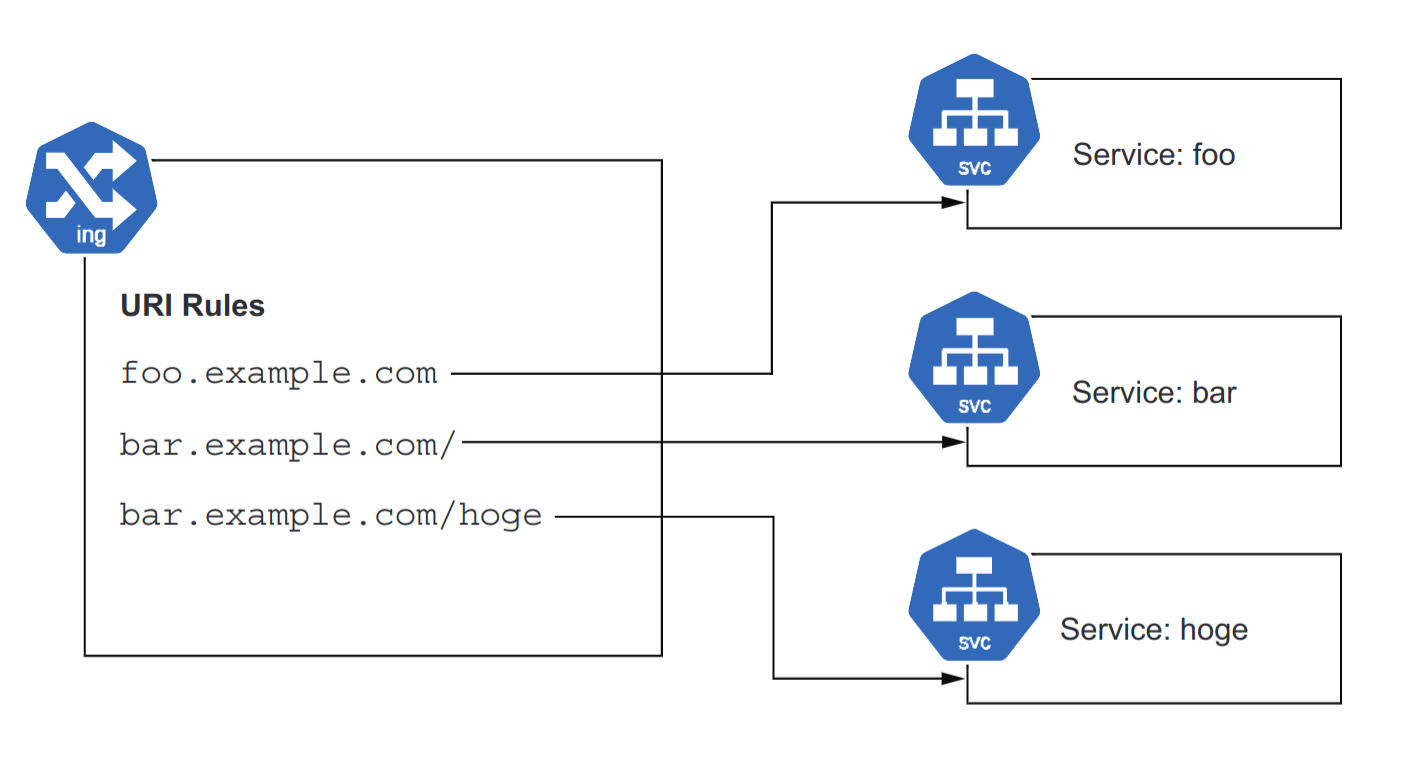
- The ability to have multiple services running on a single IP, serving different paths under a single domain name, is unique to Ingress,
- If you had exposed them with individual Services of type
LoadBalancer- The services would have separate IP addresses, necessitating separate domains (e.g.,
foo.example.comto address one, andbar.example.comto address the other).
- The services would have separate IP addresses, necessitating separate domains (e.g.,
- If you had exposed them with individual Services of type
- Perform TLS encryption for you.
- The property of Ingress being able to place multiple services under one host is useful when scaling up your application.
- When you need to break up your services into multiple services for developer efficiency (e.g., teams wanting to manage their own deployment lifecycle) or scaling (e.g., being able to scale aspects of the application separately), you can use Ingress to route the requests while not altering any public-facing URLs.
- For example;
- Let’s say that your application has a path that is a particularly CPU-intensive request.
- You might wish to move it to its own service to allow it to be scaled separately.
- Ingress allows you to make such changes seamlessly to end users.
Docs:
¶ Setup
- add & install NGINX helm chart.
- Add ip to domain name DNS records. (e.g. namcheap domain).
- apply
service.yaml&deployment.yaml. - apply
ingress.yamlwith no issuer in annotation.
- The IP address of the ingress may not match the IP address that the ingress-nginx-controller.
- This is OK, and is a quirk/implementation detail of the service provider hosting your cluster.
- Use the IP address that was defined and allocated for the nginx LoadBalancer.
- deploy cert-manager
- create
issuer-prod.yamlin namespace or for cluster.
- defines how cert-manager will request TLS certificates.
- https://cert-manager.io/docs/concepts/issuer/#namespaces
- Issuer is namespace specific.
- Or use
ClusterIssuers
¶ Ingress - NGINX
¶ NGINX Install
- https://cert-manager.io/docs/tutorials/acme/nginx-ingress/#issuers
- https://kubernetes.github.io/ingress-nginx/deploy/
#!/bin/sh

###### Add the latest helm repository for the ingress-nginx
helm repo add ingress-nginx https://kubernetes.github.io/ingress-nginx
###### Update the helm repository with the latest charts:
helm repo update
#### Use helm to install an NGINX Ingress controller:
helm install ingress-nginx ingress-nginx/ingress-nginx
¶ Service Discovery - ENV variables
Kubernetes automatically creates an environment variable for each Service, populates it with the cluster IP, and makes the IP available in every Pod created after the Service is created. The variable follows a naming conversion whereby our example robohashinternal Service gets the environment variable ROBOHASH_INTERNAL_SERVICE_HOST.
Rather than figuring out the correct conversion, you can view a list of all such environment variables available to your Pod by running the env command on your Pod with exec (with truncated output):
kubectl get pods
# NAME                      READY STATUS RESTARTS AGE
# robohash-6c96c64448-7fn24 1/1   Running 0       2d23h
kubectl exec robohash-6c96c64448-7fn24 -- env
# ROBOHASH_INTERNAL_PORT_80_TCP_ADDR=10.63.243.43
# ROBOHASH_INTERNAL_PORT_80_TCP=tcp://10.63.243.43:80
# ROBOHASH_INTERNAL_PORT_80_TCP_PROTO=tcp
# ROBOHASH_INTERNAL_SERVICE_PORT=80
# ROBOHASH_INTERNAL_PORT=tcp://10.63.243.43:80
# ROBOHASH_INTERNAL_PORT_80_TCP_PORT=80
# ROBOHASH_INTERNAL_SERVICE_HOST=10.63.243.43
¶ Service Discovery - DNS
The other way to discover services is via the cluster’s internal DNS service.
For Services running in a different namespace than the Pod, this is the only option for discovery.
The Service’s name is exposed as a DNS host, so you can simply do a DNS lookup on robohash-internal (or use http:/ /robohash-internal as your HTTP path), and it Listing 7.3 Chapter07/7.1_InternalServices/timeserver-deploy-env.yaml Service discovery using environment will resolve.
When calling the service from other namespaces, append the namespace—for example, use robohash-internal.default to call the service robohashinternal in the default namespace. The only downside to this approach is that it’s a little slower to resolve that IP address, as a DNS lookup is needed. In many Kubernetes clusters, this DNS service will be running on the same node, so it’s pretty fast; in others, it may require a hop to the DNS service running on a different node or a managed DNS service, so be sure to cache the result. Since we previously made the endpoint URL an environment variable of the Deployment, we can easily update the variable, this time giving it the service name (http:/ /robohash-internal). The complete Deployment will look like the following listing.
apiVersion: apps/v1
kind: Deployment
metadata:
  name: timeserver
spec:
  replicas: 1
  selector:
    matchLabels:
      pod: timeserver-pod
  template:
    metadata:
      labels:
        pod: timeserver-pod
    spec:
      containers:
      - name: timeserver-container
        image: docker.io/wdenniss/timeserver:5
        env:
        - name: AVATAR_ENDPOINT
          value: http://robohash-internal
from http.server import ThreadingHTTPServer, BaseHTTPRequestHandler
from datetime import datetime, timedelta
import urllib.request
import os
import random

last_ready_time = datetime.now()

class RequestHandler(BaseHTTPRequestHandler):

    def do_GET(self):
        global last_ready_time

        match self.path:
            case '/':
                now = datetime.now()
                response_string = now.strftime("The time is %-I:%M %p, UTC.")
                self.respond_with(200, response_string)
            case '/avatar':
                url = os.environ['AVATAR_ENDPOINT'] + "/" + str(random.randint(0, 100))
                try:
                    with urllib.request.urlopen(url) as f:
                        data = f.read()
                        self.send_response(200)
                        self.send_header('Content-type', 'image/png')
                        self.end_headers()
                        self.wfile.write(data)
                except urllib.error.URLError as e:
                    self.respond_with(500, e.reason)
            case '/healthz':
                if (datetime.now() > last_ready_time + timedelta(minutes=5)):
                    self.respond_with(503, "Not Healthy")
                else:
                    self.respond_with(200, "Healthy")
            case '/readyz':
                dependencies_connected = True
                # TODO: actually verify any dependencies
                if (dependencies_connected):
                    last_ready_time = datetime.now()
                    self.respond_with(200, "Ready")
                else:
                    self.respond_with(503, "Not Ready")
            case _:
                self.respond_with(404, "Not Found")

    def respond_with(self, status_code: int, content: str) -> None:
        self.send_response(status_code)
        self.send_header('Content-type', 'text/plain')
        self.end_headers()
        self.wfile.write(bytes(content, "utf-8"))

def startServer():
    try:
        server = ThreadingHTTPServer(('', 80), RequestHandler)
        print("Listening on " + ":".join(map(str, server.server_address)))
        server.serve_forever()
    except KeyboardInterrupt:
        server.shutdown()

if __name__== "__main__":
    startServer()
Deploy to cluster.
cd Chapter07/7.1_InternalServices
kubectl create -f robohash-deploy.yaml
# deployment.apps/robohash created
kubectl create -f robohash-service.yaml
# service/robohash-internal created
kubectl create -f timeserver-deploy-dns.yaml
# deployment.apps/timeserver created
kubectl create -f timeserver-service.yaml
# service/timeserver created
kubectl get svc/timeserver

NAME         TYPE           CLUSTER-IP      EXTERNAL-IP    PORT(S)        AGE
timeserver   LoadBalancer   10.22.130.155   203.0.113.16   80:32131/TCP   4m25s

open "http:/ /203.0.113.16/avatar"
¶ GCP Service Accounts
#!/bin/sh

PROJECT_ID=<PROJECT_ID>
YOUR_CLUSTER_NAME=<CLUSTER_NAME>
- To allow a service running in a Google Kubernetes Engine (GKE) cluster to access a private Cloud Storage bucket
- You'll need a Google Cloud IAM Service Account with permissions to access Cloud Storage.
- This ensures secure, keyless access to your private Cloud Storage bucket from GKE Pods. 🚀 Let me know if you need more help!
¶ Summary:
✅ Created a Google IAM Service Account with Storage permissions
✅ Enabled Workload Identity on GKE
✅ Created a Kubernetes Service Account (KSA) and linked it to IAM
✅ Updated Kubernetes Deployment to use KSA
✅ Updated C# code to use default credentials
¶ Create the Service Account
gcloud iam service-accounts create gke-storage-access \
  --display-name "GKE-storage-access"
Assign the necessary roles to the service account:
gcloud projects add-iam-policy-binding $PROJECT_ID \
  --member="serviceAccount:gke-storage-access@$PROJECT_ID.iam.gserviceaccount.com" \
  --role="roles/storage.objectAdmin"
This gives read and write access to all objects in the Cloud Storage bucket. If you only need read access, use:
--role="roles/storage.objectViewer"
¶ 2️⃣ Enable Workload Identity on GKE
GKE Workload Identity allows your Pods to automatically authenticate to Google Cloud services without needing a service account key file.
gcloud container clusters update $YOUR_CLUSTER_NAME \
  --workload-pool=$PROJECT_ID.svc.id.goog \
  --zone=europe-west6-a
¶ 3️⃣ Bind the IAM Service Account to a Kubernetes Service Account
Create a Kubernetes Service Account (KSA) and link it to your Google IAM Service Account:
kubectl create serviceaccount gke-storage-access
OUTPUT: serviceaccount/gke-storage-access created
¶ Bind the KSA to the Google IAM Service Account
gcloud iam service-accounts add-iam-policy-binding \
  gke-storage-access@$PROJECT_ID.iam.gserviceaccount.com \
  --role=roles/iam.workloadIdentityUser \
  --member="serviceAccount:$PROJECT_ID.svc.id.goog[gke-storage-access/gke-storage-access]"
OUTPUT:
Updated IAM policy for serviceAccount [gke-storage-access@<PROJECT_ID>.iam.gserviceaccount.com].
bindings:
- members:
  - serviceAccount:<PROJECT_ID>.svc.id.goog[gke-storage-access/gke-storage-access]
  role: roles/iam.workloadIdentityUser
etag: AwYeRP348JR=
version: 1
¶ Annotate the KSA with the Google IAM Service Account
kubectl annotate serviceaccount gke-storage-access
iam.gke.io/gcp-service-account=gke-storage-access@$PROJECT_ID.iam.gserviceaccount.com
output: serviceaccount/gke-storage-access annotated
¶ 4️⃣ Update Your GKE Deployment
Modify your Kubernetes deployment YAML to use the Kubernetes Service Account (KSA):
apiVersion: apps/v1
kind: Deployment
metadata:
  name: my-app
spec:
  template:
    spec:
      serviceAccountName: gke-storage-access  # Use the Kubernetes service account
¶ 5️⃣ Modify Your C# Code to Use Default Credentials
Since Workload Identity provides credentials automatically, update your GoogleCloudStorageService constructor to remove the need for a service account JSON file:
¶ ✅ Updated C# Code
public GoogleCloudStorageService()
{
    _storageClient = StorageClient.Create(); // Uses default credentials from Workload Identity
}
This will automatically use the GKE Workload Identity credentials when running inside the cluster.
¶ 6️⃣ Deploy and Test
- Deploy your updated app to GKE.
- Run logs to confirm authentication:
kubectl logs -l app=my-app
kubectl get serviceaccount gke-storage-access -o yaml

apiVersion: v1
kind: ServiceAccount
metadata:
  annotations:
    iam.gke.io/gcp-service-account: gke-storage-access@<PROJECT_ID>.iam.gserviceaccount.com
  creationTimestamp: "2026-02-03T23:09:54Z"
  name: gke-storage-access
  namespace: default
  resourceVersion: "12345"
  uid: a7be0640-f040-333d-a946-a34d0c94are1
¶ Environment Variables
- Kubernetes YAML is not a shell script, so it does not expand environment variables like Bash.
- However, using ConfigMaps, Secrets, envsubst, or Helm allows you to inject environment variables dynamically.
¶ Define LIFETIME_SECONDS as a GitHub Actions Variable
- If you want to set a number environment variable in GitHub Actions and pass it to your Kubernetes Deployment YAML
- Use this syntax:
value: "${LIFETIME_SECONDS}"
| Approach | How It Works |
|---|---|
| envsubst (Recommended for Direct YAML Replacement) | GitHub Actions replaces ${LIFETIME_SECONDS} in YAML before applying it |
| ConfigMap (Recommended for Persistent Values) | GitHub Actions sets the value in a ConfigMap and Kubernetes references it |
¶ 1️⃣ Define LIFETIME_SECONDS as a GitHub Actions Variable
You can set it as:
- A Repository Secret (for sensitive data)
- A Repository or Environment Variable (for non-sensitive data)
¶ Option 1: Set as Repository Secret
- Go to your GitHub repository.
- Navigate to Settings → Secrets and variables → Actions.
- Click New repository secret.
- Name it:
LIFETIME_SECONDS - Value:
3600
¶ Option 2: Set as a Repository Variable
- Go to Settings → Variables → Actions.
- Click New repository variable.
- Name it:
LIFETIME_SECONDS - Value:
3600
¶ 2️⃣ Use the Variable in GitHub Actions Workflow
Modify your .github/workflows/deploy.yml file to export the variable before applying the Kubernetes manifest.
¶ Example Workflow
name: Deploy to Kubernetes
on:
  push:
    branches:
      - main
jobs:
  deploy:
    runs-on: ubuntu-latest
    steps:
      - name: Checkout Repository
        uses: actions/checkout@v4

      - name: Set up Kubernetes CLI
        uses: azure/setup-kubectl@v3
        with:
          version: "latest"

      - name: Authenticate with Kubernetes
        run: |
          echo "${{ secrets.KUBECONFIG }}" | base64 --decode > kubeconfig
          export KUBECONFIG=kubeconfig

      - name: Set Environment Variable and Apply Deployment
        env:
          LIFETIME_SECONDS: ${{ secrets.LIFETIME_SECONDS }}
        run: |
          envsubst < k8s/deployment.yaml | kubectl apply -f -
✅ This ensures that $LIFETIME_SECONDS is replaced with the actual value before applying the Kubernetes deployment.
¶ 3️⃣ Update Your Kubernetes Deployment Manifest
Since Kubernetes does not expand environment variables inside YAML files, modify your deployment to reference the environment variable dynamically.
¶ k8s/deployment.yaml
apiVersion: apps/v1
kind: Deployment
metadata:
  name: frontend
spec:
  replicas: 1
  selector:
    matchLabels:
      app: frontend
  template:
    metadata:
      labels:
        app: frontend
    spec:
      containers:
        - name: frontend
          image: docker.io/username/frontend:latest
          env:
            - name: LIFETIME_SECONDS
              value: "${LIFETIME_SECONDS}"  # Placeholder to be replaced by envsubst in GitHub Actions
¶ 4️⃣ Alternative: Use a ConfigMap for Kubernetes
If you prefer not to modify the YAML dynamically in GitHub Actions, inject the value via a Kubernetes ConfigMap.
GitHub Actions Workflow to Create ConfigMap
- name: Create ConfigMap
  run: |
    kubectl create configmap app-config --from-literal=LIFETIME_SECONDS=${{ secrets.LIFETIME_SECONDS }} --dry-run=client -o yaml | kubectl apply -f -
¶ Modify Deployment to Use ConfigMap
env:
  - name: LIFETIME_SECONDS
    valueFrom:
      configMapKeyRef:
        name: app-config
        key: LIFETIME_SECONDS
¶ Observability
Log Agent -> Log Aggregator -> Log Storage -> Grafana
- Prometheus scrapes your apps and Kubernetes for metrics.
- Loki collects logs (typically via promtail, fluentbit, or the Grafana Agent).
- Tempo receives traces (via OpenTelemetry SDKs/Collectors).
- Grafana is the UI that reads from Prometheus, Loki, and Tempo.
¶ Log Agents (Collection)
Here are 10 popular open-source tools that fall into the Log Collection / Log Shipping / Log Processing category in observability pipelines:
¶ ✅ 1. Fluent Bit
- Language: C
- Use: Lightweight log processor and forwarder.
- Highlights: Fast, pluggable, low memory footprint.
- Common Outputs: Loki, Elasticsearch, Kafka, S3.
🔗 https://fluentbit.io/
¶ ✅ 2. Fluentd
- Language: Ruby (with C extensions)
- Use: Versatile log collector and router.
- Highlights: Rich plugin ecosystem, more heavyweight than Fluent Bit.
- Common Outputs: Elasticsearch, Kafka, Loki, HDFS.
🔗 https://www.fluentd.org/
¶ ✅ 3. Promtail
- Language: Go
- Use: Log shipping agent for Loki.
- Highlights: Native integration with Grafana Loki and Kubernetes metadata enrichment.
🔗 https://grafana.com/docs/loki/latest/clients/promtail/
¶ ✅ 4. Logstash
- Language: JRuby (Ruby on JVM)
- Use: Part of the ELK stack, powerful log ingestion and transformation engine.
- Highlights: Complex event processing and filtering with plugins.
🔗 https://www.elastic.co/logstash/
¶ ✅ 5. Vector
- Language: Rust
- Use: High-performance observability data pipeline.
- Highlights: Event-driven, safe concurrency, low resource usage.
- Outputs: Loki, Elasticsearch, S3, ClickHouse, etc.
🔗 https://vector.dev/
¶ ✅ 6. rsyslog
- Language: C
- Use: System-level log router.
- Highlights: Supports structured logging, TCP/UDP, file, or remote destinations.
- Often used: On Linux systems.
🔗 https://www.rsyslog.com/
¶ ✅ 7. syslog-ng
- Language: C
- Use: Reliable syslog daemon and forwarding agent.
- Highlights: TLS, JSON support, flexible routing logic.
🔗 https://www.syslog-ng.com/
¶ ✅ 8. Filebeat
- Language: Go
- Use: Lightweight log shipper (part of Elastic Beats).
- Highlights: Ships log files directly to Elasticsearch or Logstash.
🔗 https://www.elastic.co/beats/filebeat
¶ ✅ 9. Graylog Sidecar
- Language: Go
- Use: Collector agent manager for Graylog.
- Highlights: Supports Filebeat, Winlogbeat, NXLog, and custom backends.
🔗 https://docs.graylog.org/en/latest/pages/sidecar.html
¶ ✅ 10. OpenTelemetry Collector
- Language: Go
- Use: General-purpose observability collector.
- Highlights: Supports logs, metrics, and traces. Highly configurable pipelines.
🔗 https://opentelemetry.io/docs/collector/
| Tool | Footprint | Transform Logs | Best For |
|---|---|---|---|
| Fluent Bit | Very low | Basic | Embedded or edge deployments |
| Fluentd | Medium | Rich | Complex log routing |
| Vector | Low | Advanced | High-performance log streaming |
| Promtail | Low | Minimal | Grafana Loki users |
| Logstash | Heavy | Very rich | ELK stack environments |
| Filebeat | Low | Basic | Simple log file shipping |
| OTel Collector | Medium | Moderate | Logs + metrics + traces (all-in-one) |
¶ Log Agent Transformations
"Transform Logs" refers to the process of modifying, enriching, or restructuring raw log data before it's stored or forwarded to a destination (like Elasticsearch, Loki, or S3). It’s a crucial step in making logs more useful, efficient, and queryable.
¶ 🔧 Common Log Transformations Include:
¶ 1. Parsing
Extracting structured fields from unstructured log lines (e.g., splitting Apache logs into ip, timestamp, status).
✅ Example:
Raw: 127.0.0.1 - - [31/Jul/2025:10:23:45] "GET /index.html HTTP/1.1" 200
Parsed: {"ip": "127.0.0.1", "method": "GET", "path": "/index.html", "status": 200}
¶ 2. Filtering
Dropping or including only certain logs (e.g., removing health check logs or including only ERROR level logs).
✅ Example:
if log.level != "ERROR":
    drop()
¶ 3. Enrichment
Adding additional metadata such as Kubernetes pod name, namespace, geo-IP info, or application version.
✅ Example:
Add fields: {"k8s_namespace": "production", "app_version": "v1.2.3"}
¶ 4. Redaction
Masking or removing sensitive data like API keys, passwords, or PII before logs are stored or forwarded.
✅ Example:
Transform: "Bearer abc123" → "Bearer ****"
¶ 5. Reformatting
Converting log formats — for example, converting from plain text to JSON or changing timestamp formats.
✅ Example:
Convert:
"timestamp": "31/Jul/2025:10:23:45"
→
"timestamp": "2025-07-31T10:23:45Z"
¶ 🧠 Why Transform Logs?
- Storage optimization: Reduce volume by removing junk logs or compressing fields.
- Improved searchability: Structured logs make querying in Grafana, Kibana, or Loki far more efficient.
- Compliance: Redact sensitive fields to meet privacy/legal requirements.
- Enrichment: Add missing context to logs for better traceability.
¶ Tools That Support Log Transformation
| Tool | Transform Capability | Notes |
|---|---|---|
| Fluent Bit | ✅ Basic → Advanced (via Lua, Regex, filters) | Very fast and lightweight |
| Fluentd | ✅ Rich plugins, Ruby scripting | Very flexible |
| Logstash | ✅ Extremely powerful | Best for complex pipelines |
| Vector | ✅ Strong DSL (remap) for transforming logs |
Written in Rust |
| OpenTelemetry Collector | ✅ Transform processors available | All-in-one observability |
¶ Log Aggregation/Storage
- Loki, Elasticsearch, OpenSearch, ClickHouse, InfluxDB, VictoriaLogs, Logstash, AppDynamics
- A major concern at this level is the requirements for the storage layer itself.
Here’s a list of the 10 biggest and most widely used open-source tools for log aggregation and log storage in Kubernetes environments. These tools focus on collecting, processing, aggregating, and storing logs at scale.
¶ 🚀 Top 10 Open Source Log Aggregation & Storage Tools for Kubernetes
| Rank | Tool | Description | Storage Backend |
|---|---|---|---|
| 1️⃣ | Loki (Grafana Labs) | Like Prometheus for logs. Stores logs with minimal indexing for efficient querying via labels. | Object storage, local FS, S3, GCS |
| 2️⃣ | Elasticsearch | Search engine used in ELK/EFK stack to store and index logs. Heavy but powerful. | Elasticsearch cluster |
| 3️⃣ | OpenSearch | Open-source fork of Elasticsearch maintained by AWS. Used in the OpenSearch Dashboards stack. | OpenSearch cluster |
| 4️⃣ | Fluent Bit | Lightweight log shipper and processor. Often paired with Loki or Elasticsearch. | Sends logs downstream |
| 5️⃣ | Fluentd | Log aggregator and processor with a plugin ecosystem. Older but still widely used. | Sends logs downstream |
| 6️⃣ | Vector (by Timber.io) | High-performance log router and aggregator. Very efficient and modern. | File, S3, Elasticsearch, Loki, Kafka, etc. |
| 7️⃣ | Logstash | ELK stack log processor. Heavyweight, but powerful for parsing and transforming logs. | Elasticsearch or other outputs |
| 8️⃣ | Graylog | Centralized log management with search, alerting, dashboards. Uses Elasticsearch as backend. | MongoDB + Elasticsearch |
| 9️⃣ | ZincSearch | Lightweight alternative to Elasticsearch written in Go. Good for small-scale clusters. | Embedded disk storage |
| 🔟 | Humio (Open Source Core) | Real-time log analysis tool with fast ingestion. Mostly proprietary now. | Proprietary + disk backend (limited OSS use) |
¶ 🧠 Grouped by Function:
¶ 🔄 Log Collection / Shipping Agents:
- Fluent Bit
- Fluentd
- Vector
These are usually run as DaemonSets on Kubernetes nodes and forward logs to:
¶ 🗃️ Log Aggregation & Storage Backends:
- Loki
- Elasticsearch
- OpenSearch
- Graylog
- ZincSearch
- Humio
¶ 📊 Paired Dashboards:
| Tool | Dashboard UI |
|---|---|
| Loki | Grafana |
| Elasticsearch | Kibana |
| OpenSearch | OpenSearch Dashboards |
| Graylog | Built-in |
| ZincSearch | Web UI |
¶ 🛠 Recommended Kubernetes Setups
| Stack | Collection | Aggregation/Storage | UI | Notes |
|---|---|---|---|---|
| EFK Stack | Fluentd | Elasticsearch | Kibana | Heavy but feature-rich |
| ELK Stack | Logstash | Elasticsearch | Kibana | Powerful parsing, not lightweight |
| Loki Stack | Promtail / Fluent Bit | Loki | Grafana | Lightweight, cost-effective |
| OpenSearch Stack | Fluent Bit | OpenSearch | OpenSearch Dashboards | Open-source ELK alternative |
| Vector + Loki | Vector | Loki | Grafana | High performance + low ops |
¶ Traces
- Tempo, Jaeger, OpenTelemetry
¶ Prometheus
- https://github.com/prometheus-operator/prometheus-operator
- https://artifacthub.io/packages/helm/edu/prometheus
- Prometheus server
- Pulls and stores metrics being collected from systems.
- Prometheus Operator
- Makes the Prometheus configuration Kubernetes native, and manages and operates Prometheus and Alertmanager clusters.
- Allows you to create, destroy, and configure Prometheus resources through native Kubernetes resource definitions.
¶ Metrics
- Prometheus
¶ Dashboards
¶ Kubernetes Dashboards
¶ Other Dashboards
- Kube-ops-view https://codeberg.org/hjacobs/kube-ops-view : This project presents us with a dashboard designed for large servers, where we have a significant volume of pods that we need to review at a glance.
- Kubeview https://github.com/benc-uk/kubeview : This project focuses on representing relationships between objects in Kubernetes.
- Weave Scope https://github.com/weaveworks/scope : It is intended to be a tool that covers all possible elements in a deployment with docker as runtime and weave as network manager.
- Skooner https://github.com/skooner-k8s/skooner : It is a dashboard similar to the official one and offers the possibility of viewing all the objects, along with the related events.
- Ktop https://github.com/ynqa/ktop : Application that allows showing the status of a Kubernetes cluster that works directly in the terminal.
- Kubenav https://github.com/kubenav/kubenav : Application that provides an overview of all the resources in a Kubernetes cluster, including current status information for workloads. The details view for resources provides additional information. We can view logs and events or get a shell into a container. We can also edit and delete resources or scale our workloads within the app.
- K9s https://k9scli.io : K9s is a terminal-based UI to interact with our Kubernetes clusters. This project aims to make it easier to navigate, observe, and manage your deployed applications in the wild. K9s continually watches Kubernetes for changes and offers subsequent commands to interact with your observed resources.